June 30, 2026

Quick Service Restaurant Management Guide for Better Shifts

Learn how quick service restaurant management connects staffing, inventory, POS data, and service workflows to help your restaurant run better every shift.

Speed, accuracy, and consistency shape every shift in a quick-service restaurant. A long line, a missed item, a late delivery, or a poorly timed schedule can quickly affect sales and customer trust.

That is why quick service restaurant management deserves a clear plan. Strong QSR management helps you control labor, reduce waste, improve order flow, and keep service consistent during peak hours. In this guide, you will learn what QSR management means, how it supports daily operations, which challenges to watch, and how the right tools can help you run a more efficient restaurant.

What Is QSR Management?

Quick service restaurant management, or QSR management, refers to how you plan, manage, and improve daily operations in a quick-service restaurant. It covers your staff, inventory, customer service, food quality, technology, service speed, and financial performance.

A strong QSR management process helps each part of the restaurant work together. Your staff know their roles, ingredients stay stocked, orders move quickly, and service stays consistent from one shift to the next.

Key areas of QSR management include:

  1. Staff scheduling and labor control
  2. Inventory and supply management
  3. Food preparation and service speed
  4. Customer experience
  5. Sales tracking and reporting
  6. Compliance and food safety
  7. Technology and process improvement

When you manage these areas well, you can reduce waste, improve order accuracy, control costs, and create a better experience for every customer.

The Role of QSR Management in Daily Operations

QSR management helps you keep each shift organized, consistent, and easier to control. It gives your team clear processes for taking orders, preparing food, checking accuracy, handling payments, and serving customers during busy periods.

It also helps connect the front counter, kitchen, inventory, and reporting. When these areas work together, your staff can move orders from order entry to pickup with fewer delays and fewer mistakes.

Defined roles make daily operations easier to manage. Each employee knows what to handle during prep, service, cleaning, and shift changes. This helps managers spot gaps early, correct issues quickly, and keep the team focused.

Strong QSR management also supports a more consistent customer experience. With clear standards for timing, food quality, order accuracy, and service, your restaurant can handle rush periods with better control and more reliable results.

Common Challenges You May Face

Even with a solid plan, daily operations can still run into issues that affect service, costs, and repeat visits. The most common problems often start with staffing, inventory, service speed, or consistency.

Labor Shortages and Scheduling Issues

A thin crew can put pressure on the whole shift. Customers wait longer, employees rush tasks, and mistakes become easier to miss. High turnover can also slow progress because new hires need time to learn the menu, prep steps, and service standards.

Poor scheduling can affect profit as well. Too many employees during slow hours can raise labor costs, while too few during peak hours can reduce sales and hurt the customer experience.

Inventory Waste and Cost Control

Inventory problems can hurt margins quickly. Over-ordering can lead to spoilage and wasted ingredients. Under-ordering can cause stockouts, unavailable menu items, and missed sales.

Inaccurate tracking can also hide waste, portioning issues, or supplier problems. When you track inventory closely, you can order smarter, reduce loss, and protect food costs.

Slow Service During Peak Hours

Long wait times often happen when workflows lack structure. If roles are unclear, orders can pile up. If systems feel outdated, staff may spend extra time fixing errors or repeating tasks.

Peak-hour service improves when each station has a clear process. With better order flow, kitchen coordination, and staff direction, you can serve customers faster and reduce frustration.

Inconsistent Customer Experience

Customers expect the same food quality and service each time they visit. Inconsistent recipes, uneven training, and unclear service standards can make the experience feel different from one shift to the next.

A consistent process helps protect repeat business. When staff follow the same steps for prep, service, and quality checks, customers know what to expect.

Best Practices for Managing a Quick-Service Restaurant

Better QSR management starts with clear habits you can repeat every day. When your processes stay organized, your staff can move faster, serve customers better, and protect your margins.

1. Create Standard Operating Procedures (SOPs)

Standard operating procedures give your staff a clear way to complete daily tasks. They help keep food preparation, cleaning, service, opening tasks, and closing tasks consistent across every shift.

Write procedures in simple steps. Cover how to prep ingredients, handle orders, clean stations, restock supplies, manage cash, and close the restaurant. When employees follow the same process, you reduce confusion and make training easier.

SOPs also help managers spot issues faster. If a task gets missed, you can review the process, retrain the team, and keep service on track.

2. Train Staff for Speed and Accuracy

Training helps your staff work quickly while staying accurate. Teach employees how to enter orders, prepare menu items, handle special requests, and communicate with the kitchen.

Strong training should also cover customer service. A clear greeting, accurate order confirmation, and polite handoff can improve the customer experience in small but meaningful ways.

Keep training practical. Use short refreshers, shift checklists, and hands-on coaching. When employees know the menu and the workflow, they can serve customers with better speed and fewer mistakes.

3. Monitor Labor and Food Costs

Labor and food costs affect your profit every day. Track labor percentages, overtime, food costs, waste, and ingredient usage regularly.

If labor costs rise, review your schedules against sales patterns. You may need to adjust staffing levels during slower hours or add coverage during peak periods.

If food costs increase, check portion sizes, supplier prices, spoilage, and inventory counts. Small changes in waste or over-portioning can reduce margins quickly.

Consistent cost tracking helps you make better decisions before small issues become expensive problems.

4. Use Technology to Improve Efficiency

The right tools can make QSR management easier to control. A POS system helps you process orders, track sales, manage payments, and review menu performance. Kitchen display systems help route orders to the right stations and keep preparation organized.

Inventory tools help you monitor stock levels, reduce waste, and plan purchases more accurately. Scheduling software helps you create better shifts, manage availability, and control labor costs.

Technology also gives you clearer data. Instead of relying on scattered notes or delayed reports, you can see what happens across sales, staffing, inventory, and service in one place.

5. Track Performance Metrics Regularly

Performance metrics show how your restaurant performs across key areas. Review them often so you can improve service, control costs, and plan ahead.

Useful metrics include:

  • Average ticket size
  • Order times
  • Sales trends
  • Labor costs
  • Food waste
  • Inventory usage
  • Customer feedback
  • Refunds and voids
  • Menu item performance

These numbers help you see patterns. If order times increase, review staffing and kitchen flow. If waste rises, check prep levels and inventory accuracy. If average ticket size drops, review menu pricing, promotions, and upsell opportunities.

Strong QSR management improves when you measure the right things and act on what the data shows.

How Restaurant Technology Supports QSR Management

Restaurant technology helps you see what happens across sales, staffing, inventory, and service. Instead of checking separate notes, spreadsheets, and paper tickets, you can track key details in one place and make faster decisions.

The right tools also reduce repetitive work. They help your team take orders faster, update records more accurately, and review performance with less back-and-forth.

POS Systems

A POS system helps you take orders, process payments, update menus, and track sales. It also shows which items sell well, which modifiers customers choose, and which times bring the most orders.

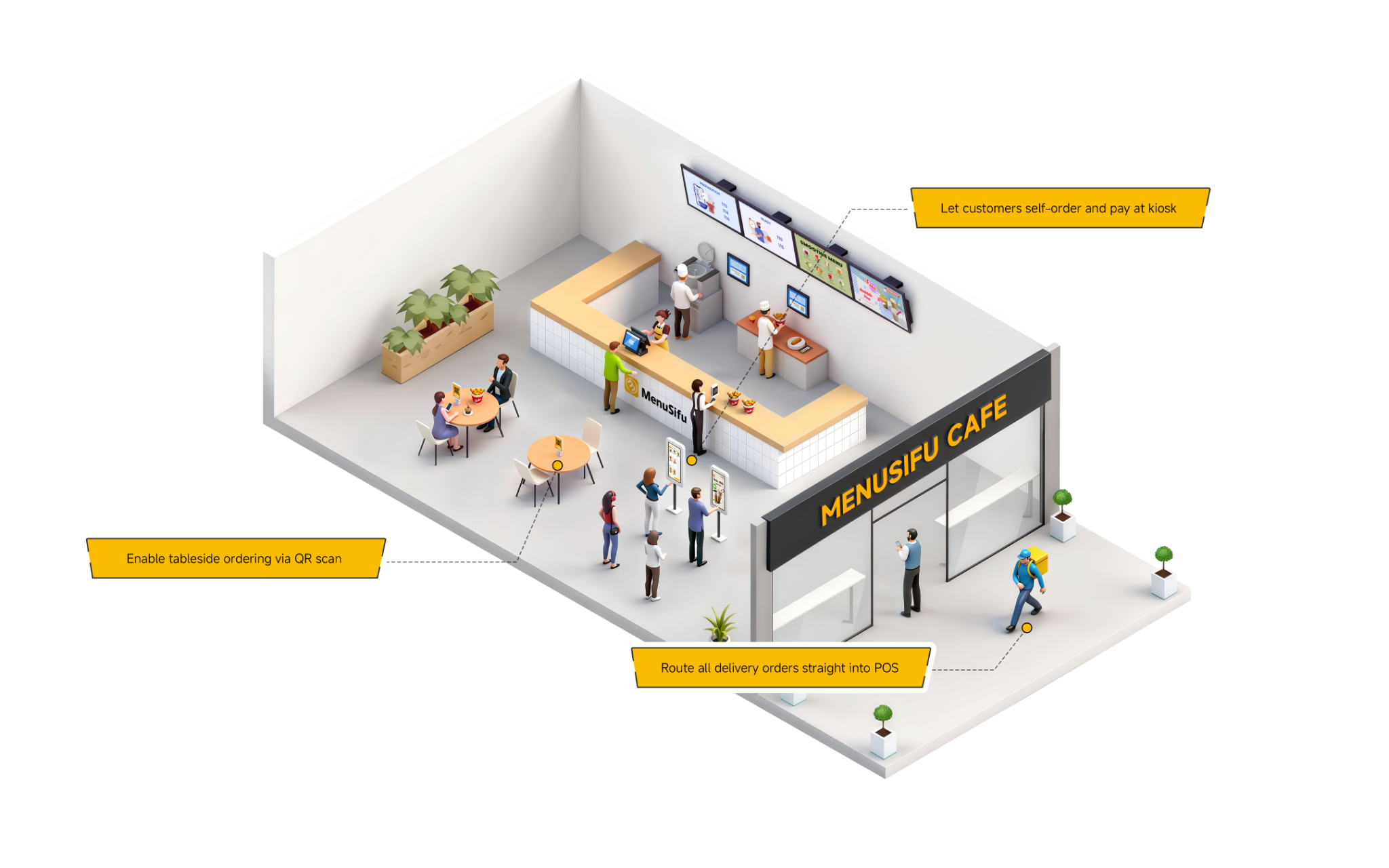
A strong POS setup also improves order flow. Orders can move from the counter, kiosk, online channel, or delivery platform to the right prep station, which helps your kitchen stay organized during busy hours.

Inventory Management Tools

Inventory management tools help you track stock levels, ingredient usage, and waste. You can see which items move quickly, which supplies run low, and which products create the most loss.

This helps you reduce waste, prevent shortages, and make better purchasing decisions. Better inventory control also helps protect food costs and keep popular menu items available.

Employee Scheduling Software

Employee scheduling software helps you plan shifts based on sales trends, staff availability, and expected demand. It can also help reduce overtime and avoid gaps during peak hours.

With organized schedules, your staff know when they work, managers spend less time making changes, and each shift has better coverage.

Reporting and Analytics

Reporting tools help you review sales, labor, inventory, order times, and customer trends. These reports show what performs well and what needs attention.

You can use this data to adjust staffing, update menu items, control costs, and improve service. Clear reports help you act earlier, before small issues affect sales or customer experience.

How to Improve Profitability Through Better QSR Management

Better QSR management improves profit by tightening the parts of the operation that affect revenue and costs every day. Start with service speed. When orders move faster and stay accurate, you can serve more customers during peak hours and reduce refunds, remakes, and complaints.

Next, review labor. Match schedules to sales patterns so you have enough coverage during rushes and leaner staffing during slower periods. This helps control payroll while keeping service steady.

Food cost deserves the same attention. Track inventory, portion sizes, waste, and vendor pricing regularly. Small losses from spoilage, over-prep, and inconsistent portions can add up quickly.

Use sales reports to guide menu decisions. Identify your best sellers, low performers, peak order times, and high-margin items. Then adjust staffing, prep plans, promotions, and menu placement based on real data.

Profit grows when your team follows clear processes, your tools give you accurate numbers, and every shift runs with less waste and better consistency.

Signs Your QSR Management Process Needs Improvement

Even a busy restaurant can lose profit when daily operations feel harder than they need to be. If the same problems keep showing up across shifts, your systems may need an update.

Look for these signs:

  • Long customer wait times
    Customers expect quick service. If lines move slowly or orders pile up during peak hours, review your staffing, order flow, kitchen setup, and POS process.
  • Frequent order mistakes
    Wrong items, missing modifiers, and mixed-up orders can hurt customer trust. These issues often come from unclear workflows, limited staff training, or disconnected order systems.
  • High employee turnover
    If employees leave often, your training, scheduling, or shift communication may need attention. Clear procedures and better tools can help staff work with less stress.
  • Uncontrolled food waste
    Spoiled ingredients, incorrect portions, and over-prepped items can cut into margins. Better inventory tracking helps you see what you use, what you waste, and what you need to reorder.
  • Inconsistent sales reporting
    If reports feel incomplete or hard to compare, you may struggle to spot trends. Accurate sales data helps you plan staffing, manage menus, and review performance.
  • Inventory shortages
    Running out of key items can lead to missed sales and disappointed customers. Regular inventory checks and automated alerts can help you stay ahead of demand.
  • Poor online reviews
    Reviews often reveal problems with speed, accuracy, food quality, or service. Track common complaints so you can fix the process behind them.
  • Difficulty managing multiple locations
    If each location follows different processes, performance can become hard to measure. Standard procedures and centralized reporting help you keep operations aligned.

These signs give you a clear starting point. Once you know where the gaps are, you can improve the systems that support your staff, service, and profitability.

Choosing the Right QSR Management Solution

The right QSR management solution should make daily work easier, give you clearer data, and help your staff serve customers with fewer delays and errors. Look for a system that fits your order volume, menu setup, staffing needs, and growth plans.

Start with the tasks that take the most time each day. Order taking, payment processing, inventory checks, scheduling, menu updates, and reporting should feel easier to manage from one place. A good solution should also be simple enough for staff to learn quickly, especially during busy shifts.

Choose tools that connect key parts of your operation. When sales, labor, inventory, and customer data work together, you can spot cost issues faster, plan shifts better, and make stronger decisions across one or more locations.

Features to Look For

  • Easy-to-use POS functionality that helps staff take orders, process payments, apply modifiers, and send tickets to the right prep stations.
  • Inventory tracking that shows stock levels, ingredient usage, waste, and reorder needs.
  • Employee scheduling that helps you plan shifts based on demand, availability, and labor targets.
  • Sales reporting that shows revenue, peak hours, menu performance, and order trends.
  • Multi-location support that helps you compare performance, manage menus, and keep operations consistent across branches.
  • Menu management that lets you update prices, combos, modifiers, and item availability quickly.
  • Integration with delivery platforms that helps centralize online orders and reduce entry errors.
  • Customer data and loyalty features that support repeat visits, targeted offers, and better customer retention.

A strong solution should help you save time, control costs, and see what happens in your restaurant each day. The easier it is to use, the easier it is to build better habits across your operation.

Build a More Efficient QSR Operation

Strong QSR management gives you better control over each shift. With clear procedures, accurate data, and connected restaurant technology, you can improve order flow, manage labor and inventory, reduce waste, and deliver a more consistent customer experience.

As your operation grows, the right POS solution can help your team work with better visibility from the counter to the kitchen. MenuSifu supports orders, payments, reporting, and daily workflows from one connected system.

See how MenuSifu supports QSR operations. Book a free demo today.

Frequently Asked Questions About Quick Service Restaurant Management

Here are quick answers to common topics about QSR management, from daily responsibilities to POS systems and profitability.

What Is QSR Management Experience?

QSR management experience refers to hands-on knowledge of managing daily operations in a quick-service restaurant. It includes staff scheduling, inventory control, food quality, customer service, service speed, sales tracking, restaurant technology, and cost management. This experience helps build smoother shifts, stronger teams, and more consistent service.

What Should a Manager of a Quick Service Restaurant Do?

A manager of a quick service restaurant should oversee daily operations, schedule staff, train employees, monitor inventory, maintain food safety, manage service speed, and track sales performance. They should also keep orders accurate, support the team during peak hours, resolve customer concerns, and use restaurant data to improve costs, service, and profitability. 

What Tools Help with Quick Service Restaurant Management?

Tools that help with quick service restaurant management include POS systems, kitchen display systems, inventory management software, employee scheduling tools, online ordering platforms, and reporting dashboards. These tools help you manage orders, track sales, control stock, plan shifts, reduce errors, and monitor performance from one place. 

How Does a POS System Support QSR Management?

A POS system helps QSR managers speed up ordering, send tickets to the kitchen, track inventory, manage staff, and review sales data in real time. It keeps orders accurate, reduces wait times, supports faster service, and gives managers the insights they need to control costs and improve daily operations. 

How Can QSR Management Improve Profitability?

QSR management can improve profitability by tracking food and labor costs, forecasting demand, reducing waste, and pricing menu items based on margin. Managers can schedule staff around sales patterns, standardize portions, train teams to upsell, and use POS data to spot slow movers, peak hours, and high-margin items. These actions raise revenue, control costs, and protect service quality. 

For more practical tips, industry insights, and restaurant technology updates, visit our blog section.

Related Articles:

想把餐厅越开越好?
免费订阅,持续获取行业报告、经营洞察与实用工具。