
September 23, 2026
Get a full breakdown of the restaurant POS system cost in 2026. Compare hardware, software, and setup pricing to build the right tech stack for your budget.
Rising operating costs make every technology decision count. A POS system sits at the center of daily service, payments, reporting, and staff workflows, so clarity around POS system cost helps you plan with confidence. Pricing varies widely, and unclear numbers can make budgeting harder than it needs to be.
This guide explains what goes into the restaurant POS system cost, how pricing models differ, and how to estimate the right investment for your operation so you can move forward with realistic expectations.

The cost of a restaurant POS system in 2026 ranges from $0 to over $300 per month, depending on the features, hardware needs, and business size.
Most cloud-based POS systems use a subscription pricing model. Entry-level plans often start around $0 to $69/month for basic setups, while full-service packages with advanced reporting, integrations, and multi-location support range from $100 to $300+/month per location. According to Fit Small Business, the average small restaurant spends $100 to $200/month for POS software alone.
Most POS providers also require hardware such as terminals, receipt printers, kitchen display systems, and card readers. These typically cost $500 to $2,500 per terminal, depending on brand and configuration. Some vendors offer bundles or hardware leasing options.
Cloud-based POS systems use subscription billing, offer remote access, and receive regular updates. They reduce upfront costs, require less IT support, and scale more easily across locations. Most modern systems in the US and Canada follow this model.
In contrast, legacy POS systems (also called on-premise or traditional systems) require a larger upfront investment for software licenses and infrastructure. They can range from $3,000 to $10,000+ per location, with additional costs for IT maintenance, updates, and hardware replacements.
Cloud systems dominate the current market due to lower setup costs, easier updates, and better integration with modern tools like online ordering and inventory platforms.
Next, we’ll break down the specific factors that influence what you pay monthly or upfront for your POS setup.
Several factors shape restaurant POS pricing, and understanding how they influence costs helps set realistic expectations. Here’s what to look for when comparing solutions:
Hardware forms the base of any POS setup. This includes terminals, cash drawers, receipt printers, card readers, and kitchen display systems. Some systems require proprietary hardware, while others work with standard devices like iPads. Costs vary depending on the quality, quantity, and vendor requirements.
Software pricing covers the POS platform itself. This often includes core features like order management, reporting, employee permissions, and more. The more advanced the software, the higher the monthly or annual cost. Some vendors bundle hardware and software into a single rate, while others charge separately.
Most cloud-based POS providers charge a subscription fee, usually monthly or annually. This often includes software updates, technical support, and access to new features. Subscription plans offer flexibility and scale more easily.
Some legacy systems offer a one-time license model. While this may lower long-term software costs, it usually requires a larger upfront investment and additional charges for upgrades or support. For some restaurants, the predictability of a subscription justifies the recurring cost.
The number of terminals directly affects the price of the restaurant POS system. Each additional device may increase both hardware and software expenses. Some providers offer discounted rates for multiple terminals or bulk software licensing.
Multi-location setups require features like centralized reporting, shared menu management, and location-based permissions. These systems are often priced by location, with additional fees for each new site added.
POS systems often integrate with tools like inventory management, online ordering, loyalty programs, or accounting software. These integrations can improve workflows and reduce manual tasks, but they often increase the restaurant POS system cost.
Some platforms include basic integrations in their base plans, while others charge extra for advanced tools. Costs may also depend on how many third-party services you want to connect or how deeply you need them to sync.
Each of these pricing factors contributes to the total cost of the restaurant POS system. Knowing how they fit together makes it easier to compare solutions and choose one that supports your goals without going over budget.
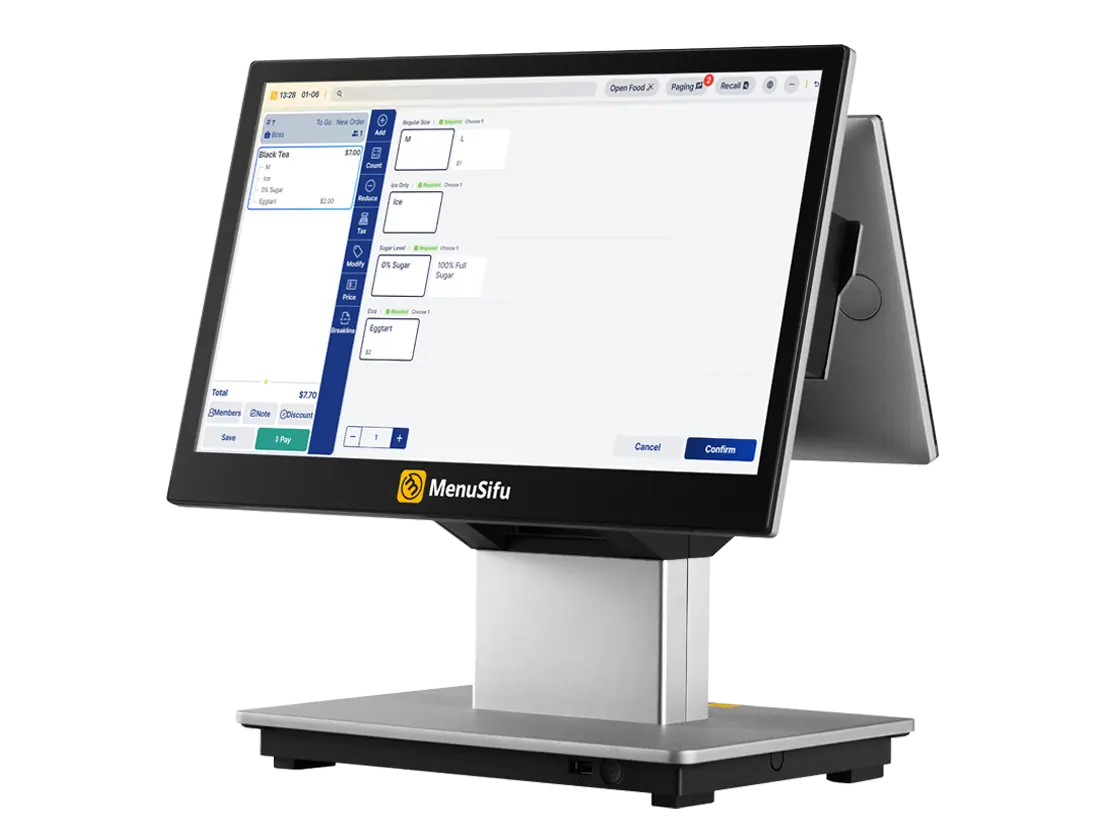
The total cost of a restaurant POS system depends on a few core components. Each piece plays a role in how much you’ll spend upfront and what to expect month to month. Here's a clear breakdown of what you're likely to pay for:
This is the physical equipment your team uses daily. Most setups include:
Prices vary based on brand and durability. Entry-level terminals might start around $500, while more advanced hardware can reach $1,200 or more per station. If you're running multiple locations or want tableside ordering, additional devices will raise your total hardware costs.
Most providers charge a monthly or annual fee for access to their POS software. Subscription plans can range from $29 to $300+ per month, depending on features like:
Some systems offer bundled pricing that includes software, support, and updates. Others charge separately, so review the pricing tiers carefully.
Initial setup can include everything from hardware configuration to menu programming and user training. Some providers offer this service at no extra cost, while others may charge a one-time fee ranging from a few hundred dollars to over $1,000, depending on the system's complexity.
If you're working with a team or managing multiple locations, setup time and cost will increase. Investing in proper installation often reduces issues during rollout.
Ongoing support is usually included in the monthly subscription, but not always. Some companies offer 24/7 live support, system monitoring, and regular software updates as part of their plan. Others may charge extra for priority support or on-site service.
Maintenance costs can also include hardware repairs or replacements over time. Knowing what’s covered in your contract can help you budget more accurately.
Breaking each cost into clear categories helps you compare vendors and pricing models. It also gives you a better picture of what you’re really paying for over time.
POS system prices vary based on how your restaurant operates. Your setup, scale, and future plans all influence what you should expect to pay.
If you manage one location, an all-in-one package can keep costs low and setup simple. Many providers offer bundled hardware and software for a flat monthly rate. Expect lower upfront spending and a system that covers the basics—ordering, payments, and basic reporting—without add-ons you don’t need. This keeps the restaurant pos system price practical and easy to manage.
Running multiple sites means pricing needs to scale. You'll likely pay more upfront for hardware and setup, but you may save in the long term with volume-based software pricing. Look for centralized menu management, location-level reporting, and integrations with inventory, labor, or loyalty tools. These features increase the cost of restaurant POS systems, but they reduce time spent managing each site separately and improve consistency across locations.
If you’re still in the planning stage, flexibility matters. Most startups benefit from cloud-based systems with minimal hardware and monthly subscriptions. This approach lowers the cost of pos system for restaurants and helps you focus spending where it counts. Some providers also offer zero-commitment trials or pay-as-you-grow plans that ease the burden early on.
Each business type approaches the restaurant pos system cost from a different angle, but the goal stays the same: get the features you need at a price that fits your operation today and tomorrow.
Using these ranges as a benchmark lets you compare vendors apples-to-apples, build a realistic budget, and select a POS that matches today’s needs without boxing you in tomorrow.
The best POS system doesn’t need to be the most expensive. It needs to match your setup, support your workflow, and grow with your business.
Instead of focusing only on monthly fees or upfront costs, look at how the system helps save time, reduce manual work, and improve accuracy. A setup that handles daily tasks reliably can pay off over time by streamlining service, managing inventory more efficiently, and reducing errors.
Choosing a POS is ultimately a financial decision. When you compare features and pricing side by side, it becomes easier to spot where you can cut waste and where it makes sense to invest. A clear view of the full cost (including hardware, software, and support) can help you find the right fit that stays within budget while setting you up for long-term efficiency.
MenuSifu helps restaurants of all sizes simplify operations and understand what they’re really paying for. If you're exploring your options, we’ll help you break down the numbers and show you how to get the tools you need—nothing more, nothing less.
Book a free demo with us today or get a customized quote built around your goals.
Choosing the right POS system starts with knowing what you’ll actually pay. These FAQs break down common pricing questions so you can make informed, cost-effective decisions.
POS system pricing typically starts at around $30 to $100 per month for basic software. Advanced plans with features like inventory tracking, customer loyalty programs, and multi-location support can range from $100 to $300+ per month. Hardware, payment processing fees, and add-ons are usually billed separately.
The average cost of a restaurant POS system ranges from $60 to $300 per month for cloud-based software. Hardware costs typically add $1,000 to $2,500 for terminals, printers, and other equipment. Pricing depends on features, number of terminals, and restaurant size.
Restaurant POS systems typically cost between $0 and $300 per month for cloud-based software, depending on features and number of terminals. Hardware costs range from $500 to $2,000 per terminal. Some providers offer bundled packages, while others charge separately for software, hardware, payment processing, and support. Expect additional fees for setup, training, and upgrades.
Yes, several POS providers offer free plans designed for small businesses. These typically include basic features like sales tracking, inventory management, and customer profiles. However, free versions often limit the number of users, locations, or advanced tools. Always review what’s included to ensure it meets your business needs.
The cheapest POS system fee often starts at $0 per month for basic software plans. These options usually limit features and still require paid hardware, payment processing, or add-ons. Most restaurants spend more once they factor in essential tools, support, and long-term reliability, so the lowest fee rarely reflects the total POS system cost.
For more insights and updates on restaurant technology, check out our blog section and stay informed about tools that support smarter operations.
DISCLAIMER: POS system pricing may vary based on provider, features, hardware, location, and current promotions. The figures in this blog are general estimates based on publicly available information as of early 2026. For the most accurate and up-to-date pricing, we recommend contacting vendors directly for a customized quote.
Related Articles:







