March 28, 2026

Fast Food Kiosk: Cost, Benefits, Features, ROI, and More

Explore fast food kiosk costs, features, benefits, and ROI so you can choose a solution that fits your POS, kitchen flow, and daily store operations with ease.

Counter traffic can pile up quickly when every order runs through the register. A fast food kiosk gives your guests another way to browse, customize, and pay while sending each order straight to your POS and kitchen. That can help you reduce input errors, support more consistent upsells, and keep peak-hour ordering on track. 

So, what should you look for in a kiosk, how much does it cost, and what kind of return can it bring to your restaurant?

What is a Fast Food Kiosk?

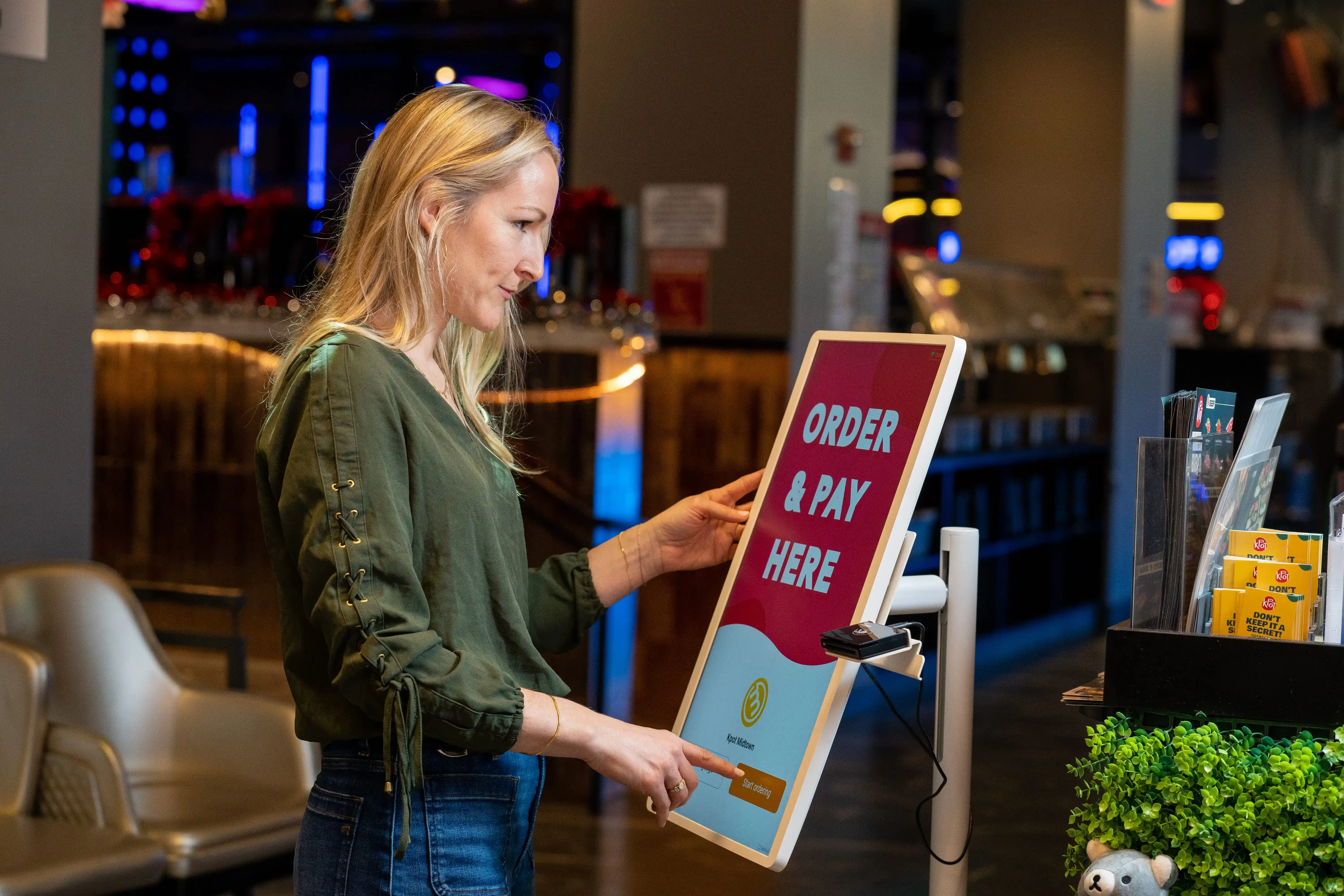
A fast food kiosk is a self-ordering screen that lets guests browse your menu, customize items, pay, and send orders straight to your POS and kitchen. Instead of routing every order through the counter, it gives your store another way to take orders during busy periods.

Guests can scroll through the menu, choose modifiers, review their cart, and check out on their own. Once they place the order, it moves directly into your POS and then to your kitchen printer or KDS. That helps reduce manual order entry and keep order details clear from checkout to prep.

In the guest journey, kiosks usually sit near the entrance, beside the counter, or along the queue. They give guests a faster way to order and create more room for add-ons, combo upgrades, and promotions on screen.

Compared with traditional counter ordering, a kiosk creates a more consistent ordering flow. It presents the same menu, modifiers, and upsell prompts every time, which helps keep ordering connected across the front counter, POS, and kitchen.

Why Restaurants Are Investing in Self Service Fast Food Kiosks

More restaurants are adding kiosks because the front counter now carries too much of the ordering load. When lines build up, staffing stays tight, and guests expect a quicker ordering experience, relying on the register alone can limit speed and consistency.

A self service fast food kiosk helps restaurants respond to those pressures by adding another ordering point in the store. It gives guests a simple way to browse the menu, customize items, and pay on screen while sending each order straight to the POS and kitchen.

Several factors are driving that demand.

Long queues are harder to manage.

High walk-in volume can overwhelm the counter during lunch, dinner, and weekend rushes. Kiosks help spread out ordering traffic and reduce pressure on one register line.

Labor shortages are pushing stores to do more with leaner teams.

Many restaurants need tools that help staff focus less on manual order entry and more on food prep, handoff, and guest support. Kiosks help shift part of that workload away from the register.

Order accuracy is under more pressure.

When staff move quickly through long lines, missed modifiers and entry mistakes become more likely. A kiosk lets guests enter and review their own selections before checkout.

Upselling at the counter is often inconsistent.

Some team members upsell well, others skip it during busy periods. A kiosk can present combo upgrades, add-ons, and promos in a more consistent way across every shift.

Guest expectations have changed.

Many guests now prefer quick, screen-based ordering in store. A fast food self service kiosk helps restaurants offer that option while keeping the ordering flow connected to POS and kitchen systems.

Key Benefits of a Fast Food Kiosk for Restaurant Operators

If long lines, missed modifiers, and uneven upsells keep showing up in your stores, a fast food kiosk can help you tighten the ordering flow and protect revenue. The biggest gains usually show up in ticket size, speed, accuracy, and store-to-store consistency.

Increased average ticket size through upsells

A kiosk puts add-ons, combos, and premium upgrades in front of every guest in the same way. That helps you drive more high-margin items per order, rather than relying on staff to suggest them at the counter. Over time, those small lifts can add up to stronger revenue across the day.

Higher throughput during busy periods

A kiosk gives guests another way to place orders, which helps move the line faster during peak hours. Orders go straight into your POS and kitchen flow, so your team can keep production moving while the front counter handles fewer bottlenecks.

Consistent menu presentation and modifiers

A kiosk displays items, options, and modifiers in one clear flow. Guests can review every detail before checkout, and the order reaches your POS and kitchen with those selections attached. That helps cut input errors, missed modifiers, and remake costs.

Lower pressure on front-counter staff

A kiosk takes part of the order-entry load off your counter team. Staff can spend more time on handoffs, dining area support, and problem resolution instead of keying in every meal, drink, and modifier.

Better data collection and reporting

Kiosks capture useful order data at the point of purchase. You can track popular items, add-on performance, promo redemption, peak ordering windows, and location trends. That gives you a clearer view of what drives sales and where to improve.

Scalable operations across multiple locations

Once your kiosk connects smoothly with your POS and kitchen setup, you can roll out the same menu logic, promotions, and ordering flow across stores. That helps you keep operations aligned as you grow and gives each location a more consistent guest experience.

Must-Have Features in a Self-Order Kiosk for Fast Food Restaurants

When comparing kiosk options, focus on features that affect speed, order accuracy, and daily store control. A strong fast food self order kiosk should fit cleanly into your POS and kitchen flow, keep ordering easy for guests, and give your team more control from the front counter to the expo line.

1. Intuitive touchscreen ordering interface

Your kiosk should feel easy from the first tap. Guests should find categories quickly, view add-ons clearly, and move through checkout with little effort. Clean navigation, readable text, and strong item visuals can help shorten lines and reduce abandoned orders.

2. Menu customization and modifier support

Fast food orders often include swaps, add-ons, combo choices, drink selections, and special requests. Your kiosk should handle those details in a clear way. It should guide guests step by step so each modifier reaches the POS and kitchen exactly as entered.

3. Upsell and combo recommendations

A kiosk should do more than take orders. It should help raise ticket size with smart prompts for sides, drinks, desserts, and combo upgrades. The best setups place these prompts at the right points in the order flow so offers feel helpful, not pushy.

4. POS integration

POS integration should sit high on your list. Your kiosk needs to sync orders, pricing, taxes, discounts, and payments with your POS in one connected flow. That keeps reporting cleaner and helps your team avoid manual entry at the counter.

5. Kitchen display system and order routing

Orders should move straight from the kiosk to the right kitchen station. Strong routing helps each ticket reach the correct printer or KDS screen with all modifiers attached. That can help your kitchen move faster and cut order mistakes during peak periods.

6. Secure payment processing

Guests need a smooth checkout experience. Your kiosk should support secure card and digital payments, process transactions quickly, and connect payment data back to your POS. Fast, stable checkout can keep the line moving and reduce drop-off at the final step.

7. Loyalty, promotions, and coupon support

Your kiosk should help you grow repeat visits, not just process one-time orders. Look for tools that let guests join your rewards program, redeem points, apply promo codes, and claim special offers right on the screen. This can turn routine orders into stronger retention opportunities.

8. Multi-language accessibility options

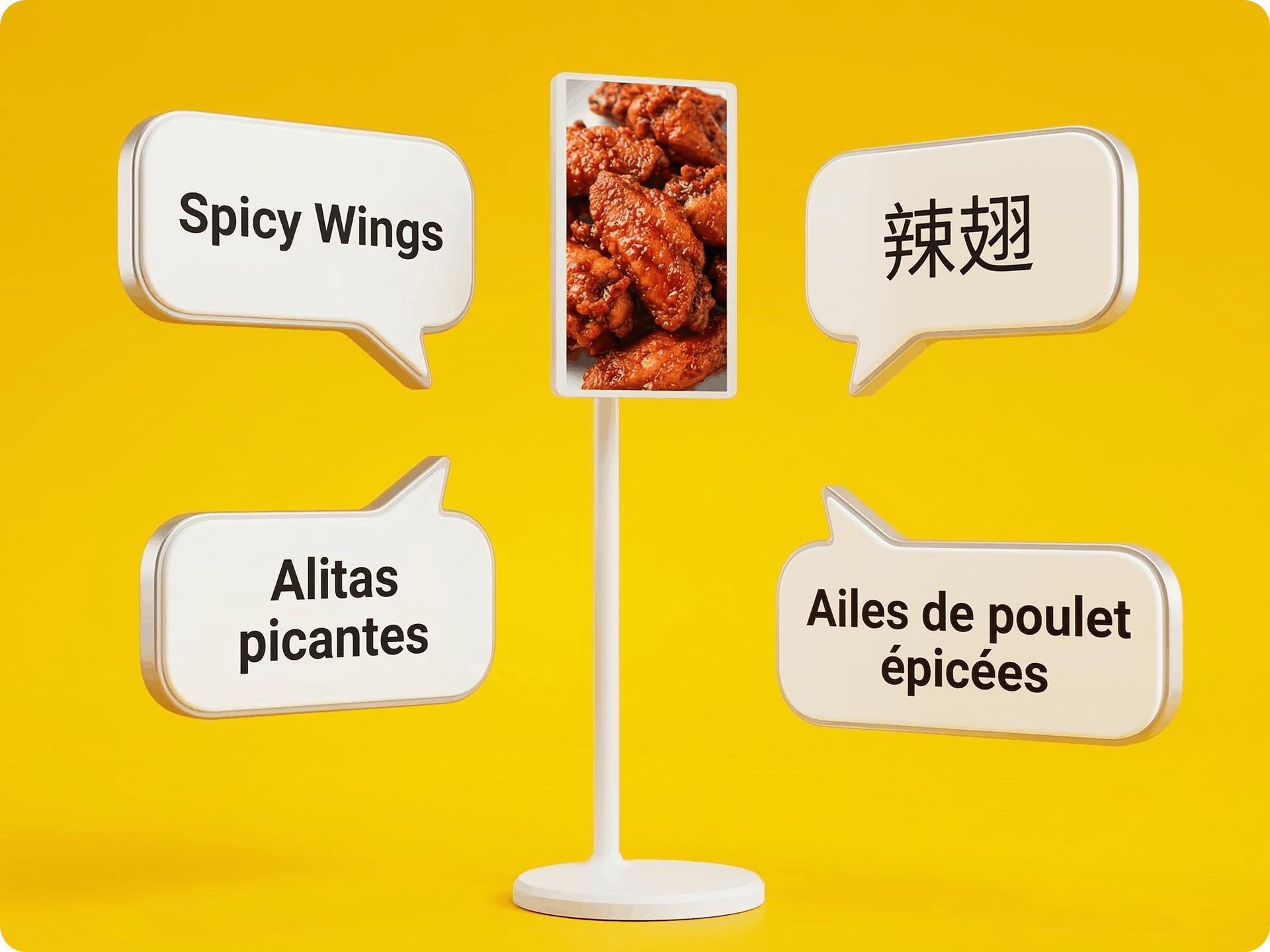
Language options can help more guests place orders with ease. If your stores serve diverse communities, your kiosk should let guests switch languages quickly and complete the order in the language they prefer. This can also reduce counter back-and-forth during busy hours.

9. Centralized menu and pricing management

If you run multiple locations, menu control can save your team a lot of time. A good kiosk platform should let you update pricing, item availability, modifiers, and promotions from one place. That helps keep stores aligned and reduces update delays across locations.

10. Analytics and performance reporting

Your kiosk should give you useful data, not just transactions. Look for reporting on order volume, top sellers, modifier trends, upsell performance, promo usage, and kiosk adoption. These insights can help you refine menu strategy, staffing plans, and offer placement over time.

How Much Does a Fast Food Kiosk Cost?

Most restaurant kiosks combine upfront hardware and setup costs with recurring software fees. Current estimates put a typical restaurant self-order kiosk at about $1,500 to $5,000 per unit, with many standard indoor units landing closer to $2,000 to $3,000. Costs can rise when you need deeper integration with your POS, KDS, kitchen printers, loyalty tools, or branded ordering flows. 

Hardware costs

Hardware usually covers the screen, stand or enclosure, payment terminal, and add-ons such as printers or scanners. Countertop units often cost less than large freestanding models, and outdoor units cost more.

Software subscription or licensing costs

Most providers charge a monthly fee per kiosk. Some kiosk software plans start at around $50 per active device per month, with hardware sold separately.

Installation and setup fees

Setup can include site prep, mounting, menu build, and staff training. Some vendors include part of this in the package, while others charge extra.

Integration and customization costs

Costs rise when you connect the kiosk to POS, KDS, kitchen printers, loyalty, or inventory tools, or when you add custom workflows and branded screens.

Ongoing maintenance and support

Plan for software updates, device upkeep, replacement parts, and payment processing fees. Some vendors bundle updates and support into recurring plans, while others charge separately.

Total cost of ownership for single-location vs. multi-location brands

A single location may need only one or two kiosks and a lighter rollout. Multi-location groups need to budget for more devices, store-by-store installation, central menu control, and chain-wide integration work. Upfront spend rises with scale, but standardizing hardware and software can simplify rollout and reporting across locations

Factors That Affect Fast Food Kiosk Pricing

Fast-food kiosk pricing can vary significantly from one setup to another. Your total cost depends on how many units you need, how deeply the kiosk connects with your POS and kitchen tools, and how much support your team wants after launch.

1. Number of kiosks per store

The more kiosks you install, the higher your upfront cost. High walk-in volume, long queues, and large dining areas often call for more than one unit to keep orders moving.

2. Freestanding vs. countertop hardware

Freestanding kiosks usually cost more than countertop models because they require larger hardware and a different physical setup. Countertop units can lower costs if your store has limited space or lighter foot traffic.

3. Custom software requirements

Basic ordering flows cost less than custom builds. If you want branded screens, advanced upsell logic, loyalty prompts, or menu flows built around your operation, pricing will rise.

4. POS and third-party integrations

A kiosk that connects cleanly to your POS, KDS, kitchen printers, inventory tools, and online ordering platform often requires more setup. That added cost can pay off by keeping orders accurate and reducing manual work for your staff.

5. Payment hardware and peripherals

Card readers, receipt printers, barcode scanners, and other add-ons can increase the total price. The final amount depends on how you want guests to pay and what hardware your ordering flow requires.

6. Support, updates, and service level agreements

Ongoing support, software updates, and SLA coverage also shape long-term cost. If you run multiple locations, stronger coverage can help you keep stores online and reduce downtime during busy hours.

Fast Food Kiosk ROI: Is It Worth the Investment?

A fast food kiosk can deliver strong ROI when it lifts sales, reduces manual order-taking time, and keeps orders flowing cleanly from the screen to your POS and kitchen. The strongest gains usually show up in four areas.

Revenue lift from upselling and larger orders

Kiosks present add-ons, combos, premium toppings, and limited-time offers on every order. That keeps upsell prompts consistent across shifts and locations. Guests can review options at their own pace, which often leads to higher basket sizes.

Labor savings and operational efficiency

A kiosk takes part of the ordering load off the front counter. Your team can spend less time entering orders and more time on food prep, handoff, and dining room support. When the kiosk syncs with your POS and kitchen, staff avoid duplicate entry and reduce input errors.

Throughput improvements during peak hours

Kiosks add ordering capacity when lines build up. More guests can place orders at the same time, which helps shorten waits and move the queue faster. Direct POS and kitchen sync also helps keep tickets accurate as volume rises.

Measuring payback period and long-term ROI

Track average check, upsell rate, orders per hour, labor hours at the counter, remake rate, and kiosk adoption. Compare those numbers before and after launch. If order value rises and front-counter workload drops, your payback period can shrink quickly, especially across multiple locations.

Common Challenges of Implementing a Fast Food Self Service Kiosk

A kiosk rollout can improve ordering flow, but weak execution can limit results. Most issues show up during launch, peak periods, and daily store use.

Staff adoption and training

Your team needs a clear rollout plan. Train cashiers and shift leads to guide guests, answer basic kiosk issues, and explain how orders move from the kiosk to the POS and kitchen. When staff treat the kiosk as part of daily operations, adoption tends to improve faster.

Guest education and change management

Some guests will still head to the counter out of habit. Use signs, floor cues, and short staff prompts to direct traffic to the kiosk. Keep the interface simple, use clear menu images, and reduce extra taps so first-time users can place an order with less hesitation.

Integration issues with existing systems

Poor integration can create duplicate tickets, missed modifiers, pricing errors, or delayed order routing. Make sure the kiosk syncs menu data, payments, discounts, loyalty details, and item availability with your POS and kitchen tools. Test combos, modifiers, refunds, and out-of-stock items before launch.

Hardware maintenance and downtime

Kiosks need routine checks. Touchscreens, card readers, printers, and scanners can fail during busy hours if maintenance slips. Choose durable hardware, keep backup parts on hand, and establish a clear process for support and repairs.

Cleaning, durability, and in-store placement

A kiosk should stay clean, visible, and easy to reach. Fingerprints, grease, and spills can affect usability, especially during rush periods. Place the unit near the entrance or queue, not in a tight corner. Pick hardware built for heavy daily use and frequent cleaning.

How to Choose the Right Fast Food Kiosk Solution

The right kiosk should fit your daily traffic, connect cleanly with your POS and kitchen tools, and stay easy to manage across locations. Focus on the basics first so you can compare options with a clear set of priorities.

Evaluate Your Order Volume and Operating Setup

Start with your store flow. Look at peak-hour traffic, average ticket size, menu depth, and how often guests customize orders. A high-volume dining room may need more than one kiosk, while a smaller footprint may work well with a compact setup near the entrance or counter.

Also, review how orders move through your store. If lines build up at the register, a kiosk can shift part of that traffic to a separate ordering point. If your menu includes many modifiers, combos, or add-ons, choose a kiosk that keeps those steps clear and quick.

Check POS and Payment Compatibility

Integration should sit near the top of your list. Your kiosk should send orders, modifiers, and payments straight into your POS, then route them to kitchen printers or KDS with no extra manual steps.

Review payment support as well. Confirm that the kiosk can process the payment types your guests use most often and that refunds, voids, and promo redemptions stay aligned with your POS records. A clean payment flow helps your team avoid errors at checkout and during reconciliation.

Review Vendor Support and Onboarding

A strong vendor should help you launch with less disruption. Review the rollout process, installation scope, menu setup help, staff training, and post-launch support before you sign.

Ask how the vendor handles hardware issues, software updates, and urgent troubleshooting. If you run several locations, check how support works across stores and how quickly the team responds when a kiosk goes offline.

Compare Software Flexibility and Reporting

Good kiosk software should let you update menus, prices, modifiers, and promos from one place. It should also support branded screens, upsell prompts, loyalty features, and multilingual ordering if those features fit your stores.

Reporting deserves close attention, too. Look for dashboards that show order volume, average ticket size, top modifiers, promo use, and kiosk adoption by location. Those insights help you refine menu presentation and track results after launch.

Consider Future Scalability for Multi-Unit Growth

Choose a solution that can grow with your business. A kiosk that works for one store should also support shared menus, location-level pricing, brand controls, and centralized reporting across many units.

Review how the system handles new store openings, seasonal promotions, and menu updates at scale. If your provider can support expansion from the start, your team can keep operations more consistent as you add locations.

Who Should Use a Fast Food Kiosk?

A fast food kiosk works best when your store needs to move lines faster, cut order errors, and keep every order tied closely to your POS and kitchen. If you handle steady walk-in traffic, dine-in orders, or a menu with lots of modifiers, a kiosk can take pressure off the counter and create a cleaner ordering flow.

  • Quick-service restaurants

If your line builds up during lunch or dinner, a kiosk gives customers another way to place orders. It can speed up checkout, reduce order-entry mistakes, and keep modifiers clear as tickets move into the POS and kitchen.

  • Fast-casual chains

If your menu includes bowls, combos, add-ons, or dietary swaps, a kiosk helps customers customize each order on screen. That can lead to cleaner tickets and more consistent upsells across every shift.

  • High-volume franchise operators

Busy locations need consistency. A kiosk helps standardize menu presentation, promo prompts, and order flow across stores, while keeping reporting and kitchen handoff aligned.

  • Convenience stores and food courts

In smaller spaces, a kiosk can reduce counter congestion and guide grab-and-go orders more clearly. It also helps when one team handles both checkout and food prep.

  • Multi-location restaurant groups

If you want one ordering flow across several stores, kiosks can support that goal. With strong POS and kitchen integration, you can manage menus, pricing, promos, and order routing with greater consistency.

If long queues, labor gaps, inaccurate orders, or uneven upsells keep showing up in daily operations, a fast food kiosk deserves a closer look.

Is a Fast Food Kiosk Right for Your Restaurant?

If your stores need a better way to reduce counter pressure, improve order accuracy, and drive more consistent upsells, a fast food kiosk can be a smart next step. The strongest results usually come from a setup that connects ordering, payment, POS, inventory, and kitchen routing in one flow. That gives your team a clearer path from checkout to prep and helps keep peak-hour operations on track.

If you want a solution built around connected restaurant operations, MenuSifu offers POS tools and self-ordering kiosks designed to support that goal. Guests can customize detailed orders on screen, switch between multiple languages, view dietary tags, and pay in a few taps.

Orders sync directly with your POS, inventory, kitchen printers, and KDS, while branded screens, loyalty prompts, rewards, promo offers, and gift card support help you drive repeat visits and stronger basket size. You can also choose hardware that fits your layout, from countertop units to floor-standing kiosks.

If you want to see how a kiosk can fit your stores, book a Free Demo with MenuSifu today.

Frequently Asked Questions About Fast Food Kiosks

These FAQs cover the key points you may want to review before adding kiosks to your restaurant. Use them to compare features, see how the system works, and assess fit with your POS and kitchen setup.

How Does an Automated Fast Food Kiosk Work?

An automated fast food kiosk lets customers browse the menu, customize items, place an order, and pay on a touchscreen. The system sends the order directly to your POS and kitchen, so staff receive item details and modifiers right away. This can help speed up ordering, reduce entry errors, and keep the front counter more organized.

How Do Kiosks Affect Fast Food Restaurants?

Kiosks help fast food restaurants speed up ordering, reduce order errors, and present upsells more consistently. They can shorten lines, free up staff for food prep and guest support, and improve order flow by sending selections directly to the POS and kitchen. Over time, they can also increase average check size and create a smoother guest experience.

Which Fast Food Restaurants Use Kiosks?

Many quick-service and fast-casual restaurants use kiosks, especially brands with high walk-in traffic, dine-in orders, and frequent peak-hour lines. Large burger, chicken, sandwich, and beverage chains often install them to speed up ordering, improve order accuracy, and promote add-ons more consistently. Kiosks also fit growing multi-location brands that want tighter integration between ordering, POS, and kitchen systems.

Who Makes Fast Food Ordering Kiosks?

Restaurant technology companies, POS providers, and specialized kiosk vendors make fast food ordering kiosks. Many operators choose a provider that offers the kiosk, POS, payment processing, and kitchen integration in one system so orders flow cleanly from the screen to the kitchen. When comparing vendors, look for strong hardware, easy menu management, and reliable support.

For more practical tips on restaurant technology, kiosk ordering, POS integration, and growth strategies, check out our blog section for more insights and updates.

DISCLAIMER: Pricing, features, and ROI can vary based on your restaurant’s size, store count, hardware setup, software needs, and integration requirements. This article is for general informational purposes only and should not be treated as a fixed pricing or performance guarantee.

想把餐厅越开越好?
免费订阅,持续获取行业报告、经营洞察与实用工具。