September 18, 2026
Find the best kitchen display system for your restaurant by comparing top KDS options for POS integration, order routing, kitchen speed, and future growth.

Kitchen delays, missed tickets, and scattered order channels can make every shift harder than it needs to be. When your POS, online ordering, delivery, takeout, and dining room orders all meet in the kitchen, your team needs a KDS that keeps everything clear.
The right system should route orders to the right station, show updates as they happen, help staff prioritize tickets, and keep the front and back of house aligned from prep to handoff.
So, what is the best kitchen display system for your restaurant?
In this guide, we compare MenuSifu, Toast, Square, Lightspeed, Fresh KDS, and TouchBistro to help you choose the right fit for your kitchen workflow, staff setup, order volume, and growth plans.

Start with the fit. The best KDS for your restaurant depends on how orders reach the kitchen, how many stations your team runs, and how closely you need the system to connect with your POS, online ordering, delivery, and front-of-house workflow.
For a smaller operation, Square or Fresh KDS may be enough. For a restaurant tied closely to Toast, Lightspeed, or TouchBistro, their connected KDS can work well.
For restaurants that need POS-connected ordering, multilingual screen support, station-level coordination, and high-volume order control, MenuSifu offers the strongest overall fit.

The best kitchen display system should fit how your kitchen works now and how you plan to grow. Before comparing MenuSifu, Toast, Square, Lightspeed, Fresh KDS, and TouchBistro, look at how each system handles orders, staff communication, kitchen flow, and expansion.
Start with integration. Your KDS should connect cleanly with your POS, online ordering, takeout, delivery, and dine-in orders.
A strong setup helps your team send orders to the right kitchen screen, update tickets quickly, and keep front-of-house and back-of-house staff aligned.
Look for a KDS that can handle:
If your restaurant receives orders from multiple channels, choose a KDS that consolidates them into a single, clear kitchen workflow.
Every kitchen has its own rhythm. Some teams organize tickets by full order. Others prefer to prep by item, station, or course.
Your KDS should give your team flexible views, so they can work in the format that fits them best.
Useful features include:
This type of flexibility helps your kitchen stay organized during busy periods, especially when orders come from multiple channels at once.
A KDS should make the kitchen easier to run, not harder to train. Your team should be able to read tickets clearly, update progress quickly, and spot priority orders at a glance.
Look for features such as:
If your team speaks more than one language, multilingual settings can help everyone follow the same order flow with fewer mistakes.
High-volume kitchens need speed, visibility, and order control. During peak hours, your KDS should help your team see what needs attention first.
The best kitchen display systems for busy restaurants should include:
These features help your kitchen move faster while keeping each ticket organized from prep to handoff.
Your KDS should support your next stage, not only your current setup. If you plan to add locations, expand online ordering, or improve kitchen reporting, choose a system that can grow with your operation.
Look for:
A scalable KDS gives your team a repeatable process across locations, which helps you keep operations consistent as your restaurant grows.
If you are comparing systems and planning your budget, our guide to kitchen display system price explains the cost factors to review before choosing a KDS.
Once you know what to look for, the next step is comparing how each provider fits your restaurant’s workflow. Let’s start with MenuSifu KDS.
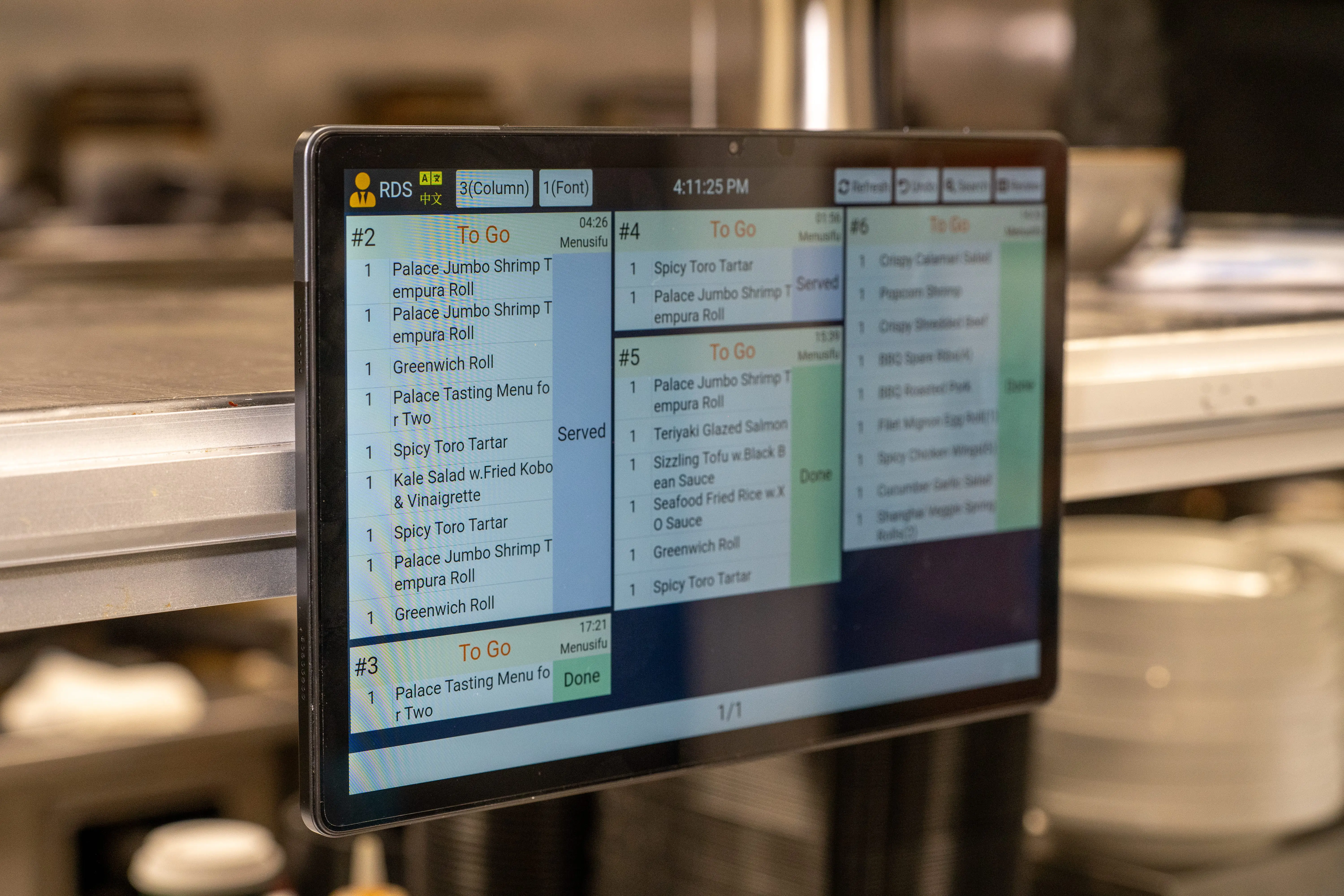
MenuSifu works best for your restaurant if you need a POS-connected KDS that supports busy kitchens, multilingual teams, dine-in, takeout, delivery, and multi-station prep.
Best-fit restaurants
MenuSifu fits high-volume restaurants, Asian restaurants, growing restaurant groups, multi-location operators, and kitchens that need POS, ordering, prep, and front-of-house workflows connected in one system.
Restaurants that only need a basic ticket screen may need time to explore MenuSifu’s broader KDS features. However, small teams can still start with core tools like digital tickets, order status tracking, and dine-in or takeout organization, then use more advanced features as their workflow grows.
MenuSifu is a strong choice for both growing small restaurants and high-volume operations. It gives smaller teams an organized way to move away from paper tickets while giving busier kitchens the tools to manage POS orders, online orders, prep stations, multilingual staff, and order status in one connected workflow.
Toast KDS is a good fit for your restaurant if you run Toast POS and want a KDS built into that platform.
Toast KDS works best for restaurants committed to Toast. If your team needs more specialized multilingual workflows or a different POS setup, compare it with MenuSifu.
Toast KDS is a strong pick for Toast-based restaurants. MenuSifu has the edge if your kitchen needs broader POS-connected workflows for high-volume, multilingual, and multi-location operations.
Square KDS fits your restaurant if you want a simple digital ticketing tool integrated with Square.
Square KDS may feel limited if your kitchen needs advanced station syncing, multilingual screen settings, barcode-based dish handoff, or deeper POS and ordering coordination.
Square KDS is a practical choice for smaller restaurants. MenuSifu is stronger for higher-volume kitchens that need more control across orders, stations, and staff communication.
Lightspeed KDS fits your restaurant if you use Lightspeed Restaurant and want kitchen order tracking inside that setup.
Lightspeed KDS works best within the Lightspeed Restaurant system. If your restaurant needs more flexible multilingual workflows and stronger POS-to-kitchen coordination, MenuSifu may fit better.
Lightspeed KDS is a good option for Lightspeed-based restaurants. MenuSifu stands out when your team needs a fuller kitchen workflow across POS, ordering, prep stations, and front-of-house updates.
Fresh KDS works best for your restaurant if you want a flexible tablet-based KDS that can connect with selected POS systems.
Fresh KDS can work well as a standalone kitchen display system, but your restaurant may prefer MenuSifu if you want POS, KDS, ordering, and front-of-house workflows from one provider.
Fresh KDS is a flexible KDS option. MenuSifu is stronger if your restaurant needs a connected POS and KDS workflow built for high-volume, multilingual, multi-station operations.
TouchBistro KDS fits your restaurant if your POS setup runs on TouchBistro and you want a Fresh-powered KDS connection.
TouchBistro KDS works best for TouchBistro users. If your restaurant wants a broader POS-connected kitchen workflow, MenuSifu or Fresh KDS may fit better depending on your setup.
TouchBistro KDS is a convenient choice for TouchBistro restaurants. MenuSifu is stronger for restaurants that need deeper coordination across POS, kitchen stations, ordering channels, and multilingual teams.
The best KDS depends on how your kitchen runs, how many order channels you manage, and how closely your POS needs to connect with the back of house. Use this guide to match each system with the type of restaurant it fits best.
If your current POS setup centers on Toast, Square, Lightspeed, or TouchBistro, their connected KDS options may feel convenient. But if your kitchen needs stronger POS-connected ordering, multilingual screen support, station-level coordination, and high-volume order control, MenuSifu stands out as the best overall choice.

A strong KDS should connect every order channel with your kitchen in one clean workflow. Your team should see what needs to be prepared, where it should go, and which tickets need attention first.
The best kitchen display integration with ordering systems should support:
MenuSifu is especially strong here because it connects POS, KDS, FOH updates, station views, and order progress in one system. Your kitchen can switch between Order Mode and Item Mode, group identical dishes for batch cooking, separate dine-in and takeout tickets, and use color alerts to spot delayed orders faster.
For kitchens with multilingual teams, MenuSifu also supports English, Chinese, French, and Spanish. Each screen can fit the team member using it, which helps FOH and BOH stay aligned during busy shifts.

The best KDS depends on your POS setup, order volume, kitchen stations, staff communication, and growth plans. Toast, Square, Lightspeed, Fresh KDS, and TouchBistro can all work well when they match your current system and daily workflow.
MenuSifu is the stronger fit if your restaurant needs tighter POS and KDS connection, multilingual screen options, dine-in and takeout separation, station-level order views, offline order flow, color-based wait alerts, and barcode-supported dish handoff. It helps your team replace paper tickets with a cleaner workflow from order entry to handoff.
If you want a KDS that connects with your POS and supports the way your kitchen works, book a free demo with MenuSifu today or contact MenuSifu for a custom KDS price estimate.
Use these quick answers to compare features, restaurant fit, and system types before choosing a KDS.
The best KDS for restaurants depends on your POS setup, order volume, kitchen workflow, and growth plans. MenuSifu is a strong choice for high-volume restaurants, Asian restaurants, multilingual teams, and multi-location groups that need POS-connected ordering, station routing, dine-in and takeout separation, and clear FOH and BOH communication.
The best smart display for a restaurant kitchen depends on your POS, order volume, and kitchen setup. For restaurant use, choose a KDS display that can handle heat, moisture, frequent tapping, clear ticket views, station routing, and direct POS connection. MenuSifu is a strong option for restaurants that need smart kitchen screens connected with POS, online ordering, takeout, delivery, and FOH workflows.
MenuSifu is a strong KDS for Asian restaurants because it supports English, Chinese, Spanish, and French across POS and kitchen screens. It helps multilingual teams track orders, manage dine-in and takeout tickets, route items by station, and keep FOH and BOH updates clear during busy shifts.
A built-in POS KDS is usually the better choice if you want orders, modifiers, table updates, takeout, delivery, station routing, and order status to stay synced in one system. A standalone KDS can work well if your current POS supports the integration and your kitchen only needs digital ticket management. For restaurants with high order volume, multiple stations, or multilingual teams, a POS-connected KDS often gives your staff a smoother workflow.
For more restaurant technology tips, check out our blog section for more insights and updates.
DISCLAIMER: Product features, pricing, and availability may change over time. This comparison is based on publicly available information and MenuSifu product details at the time of writing. Restaurant operators should confirm current features, integrations, and pricing with each provider before making a decision.