July 1, 2026
Learn how quick service restaurant digital signage helps update menus, promote offers, reduce print costs, and create a smoother ordering flow for your guests.

Quick service restaurant digital signage gives you a smarter way to keep menus accurate, promote high-value items, and guide customers from browsing to ordering. When prices change, items sell out, or new offers launch, printed signs can quickly fall behind. QSR digital signage helps you update content faster, improve menu visibility, and create a clearer ordering experience. This guide explains what it is, how it supports daily operations, where to use it, and how to set it up effectively.
Quick-service restaurant (QSR) digital signage refers to digital screens that display menus, promotions, order updates, and customer instructions inside or outside your restaurant.
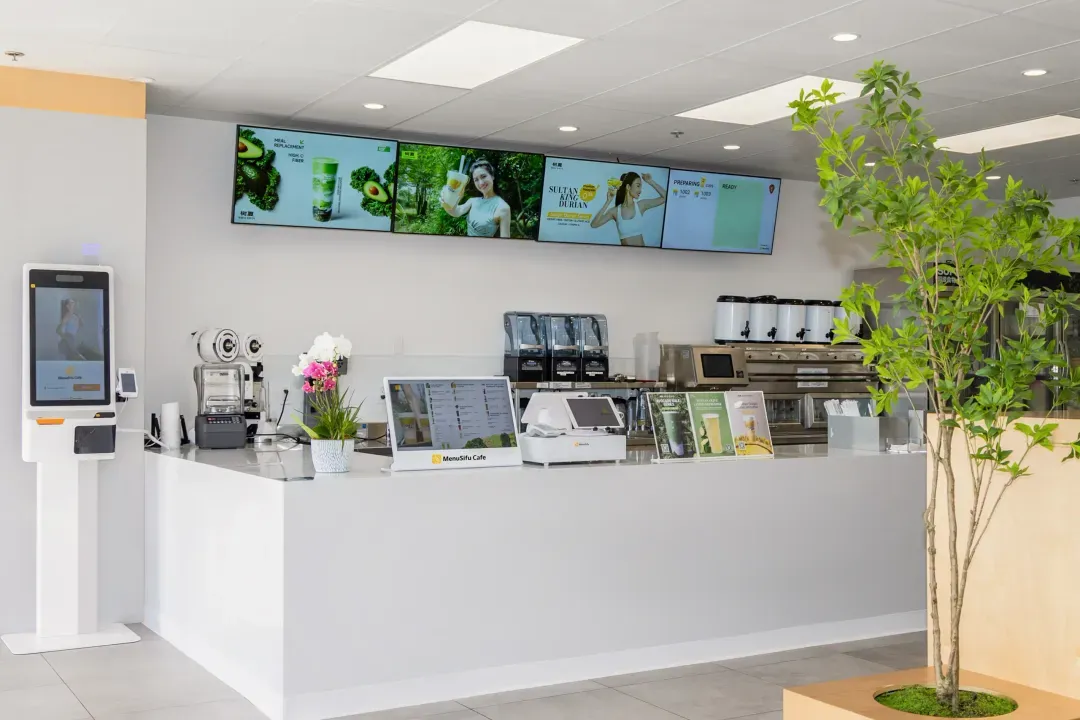
You can use these screens above the counter, near the entrance, at the drive-thru, on self-service kiosks, or in pickup areas. Instead of printing new signs every time prices, items, or offers change, you can update your screens through signage software or directly from the POS when integrated.
This helps you keep menu details accurate, promote featured items, and guide customers through the ordering process with clear, easy-to-read displays.
Digital signage helps you manage daily restaurant communication with more speed, control, and consistency. When menus, promotions, and order updates stay current, customers can make decisions faster, and your staff can focus on service instead of repeating the same information throughout the day.
Menu changes happen often. Prices shift, items sell out, new combos launch, and seasonal offers need screen time. With digital signage, you can update prices, menu items, availability, and promotions from one dashboard instead of reprinting materials.
This gives you better control during busy hours. If an item runs out, you can remove it from the screen right away. If a lunch deal starts at noon, you can schedule it in advance. If you operate more than one location, you can keep menus aligned across every branch with less manual work.
Customers want clear information before they order. Digital screens make menus, offers, wait times, and ordering instructions easier to see and follow.
A well-placed screen can guide customers from browsing to ordering. Menu boards help them compare items and prices. Order status screens show what is being prepared and what is ready for pickup. Promotional screens can point them to current deals, loyalty offers, or featured products.
Clear communication also supports your staff. When customers know what to order, where to wait, and when to pick up food, the counter feels more organized.
QSR digital signage helps you put your best offers in front of customers at the right time. You can highlight combo meals, add-ons, premium drinks, seasonal items, and limited-time offers with strong visuals and simple messaging.
This works especially well near the counter, drive-thru, and waiting area. A screen can feature a meal upgrade during lunch, a dessert add-on after dinner, or a new drink during slower hours. Instead of hoping customers notice an offer, you can place it where they are most likely to act.
QSR digital signage gives you more control over what customers see at the point of order. It helps you promote the right items, update content quickly, reduce print spending, and keep your restaurant looking consistent across every customer touchpoint.
Digital screens can guide purchase decisions right when customers are choosing what to order. A bright display with strong food visuals, short offer text, and clear upsell prompts can bring more attention to combos, add-ons, drinks, desserts, and limited-time items.
You can also match offers to the time of day. Breakfast screens can feature coffee pairings or morning bundles. Lunch screens can highlight meal deals. Afternoon screens can promote snacks, sides, or premium drinks. This helps each screen support sales during the hours when those items are most relevant.
Printed menus and posters can become outdated quickly. A price change, sold-out item, or new promotion often means another round of design, printing, delivery, and replacement.
Digital signage reduces those recurring costs because you can update menu items, pricing, and promotions through software. This gives you more flexibility when you run seasonal offers, test new items, or adjust pricing across one or several locations.
Customers order faster when menus are easy to read. Clear categories, visible prices, high-quality images, and simple layouts help people choose with less back-and-forth at the counter.
Digital screens also help customers know what to do next. Menu boards can guide ordering, promo screens can highlight current offers, and order status screens can show when food is being prepared or ready for pickup. That creates a smoother visit from ordering to pickup.
Your screens should match your restaurant’s look, tone, and menu style. Digital signage helps you keep colors, product images, layouts, and promotional messages consistent across each display.
This becomes even more useful when you manage multiple locations. A central signage system lets you update content across branches, keep menus aligned, and reduce the use of off-brand printed signs. The result is a cleaner, more professional experience every time customers walk in, order, or pick up food.
The right digital signage setup depends on how customers move through your restaurant. Some screens help people choose what to order. Others promote deals, show order updates, or attract attention from outside. Each display should have a clear purpose, so customers get the right information at the right time.
Digital menu boards are the screens customers typically see above the counter or in the ordering area. They show menu categories, item names, prices, combos, and product images.
These screens help customers scan options quickly before they order. You can also update prices, remove sold-out items, and feature new products from your signage system instead of replacing printed boards. Keep the layout clean, group items clearly, and make prices easy to read.
Promotional displays help you highlight deals, new products, loyalty programs, and seasonal campaigns. You can place them near the entrance, beside the counter, by the pickup area, or anywhere customers naturally pause.
These screens work best when they focus on one main offer. A featured combo, new drink, dessert upgrade, or loyalty reward can stand out more when the message stays simple. Use strong visuals, short copy, and clear calls to action.
Drive-thru digital signage helps customers read menus and choose add-ons before they reach the order point. These displays can show meal bundles, drink upgrades, limited-time offers, and pickup instructions.
A good drive-thru screen should be bright, clear, and easy to read from a car. Keep text short, use large pricing, and make featured items easy to spot. This helps customers decide faster and gives your staff a smoother ordering flow.
Outdoor digital signage includes storefront screens, window-facing displays, roadside signs, and QSR outdoor digital signage used to attract passing customers.
These screens can promote daily specials, best-selling items, limited-time offers, or simple brand messages. Since they face sunlight, weather, and distance, they need strong brightness, durable hardware, and anti-glare support. A clear outdoor display can help bring more people inside before they even see the full menu.
Self-service kiosk displays let customers browse the menu, customize orders, and pay on their own. They can also show branded visuals, welcome screens, featured items, and limited-time offers.
Kiosks help reduce pressure at the counter during busy hours. They also give customers more control over their orders, especially when they want to review options, add extras, or customize meals. Keep the screen flow simple, use clear buttons, and make promotions easy to add before checkout.
Once you choose the right display types, the next step is setting them up in the right locations with the right hardware, software, and content.
The best way to approach setting up QSR digital signage is to start with purpose and placement. Each screen should help customers read the menu, notice an offer, check order status, or place an order more easily.
Place screens where customers naturally look or pause. Use menu boards above the counter, promo screens near the entrance, order status screens in waiting areas, and outdoor displays at the drive-thru or storefront. Good placement helps customers get the right message at the right time.
Choose commercial-grade screens built for long operating hours. Add the right media players, secure mounts, and cable setup to keep displays stable. Use weatherproof outdoor screens for drive-thru lanes, windows, and exterior signage.
Choose a digital signage setup that works with your POS system, so menu updates, pricing, availability, and promotions stay aligned. With a connected system, you can update items, remove sold-out products, schedule offers, and manage screen content from one place. This helps keep your displays accurate while giving you better control over what customers see throughout the day.
Keep screen content easy to scan. Use readable fonts, high-quality food images, simple layouts, and limited text. Show prices clearly, group menu items by category, and give featured offers enough space to stand out.
Set your screens to switch automatically throughout the day. You can show breakfast items in the morning, lunch combos at midday, dinner offers later, and late-night deals near closing. This keeps content timely and easier to manage.
Good digital signage should help customers order faster, notice key offers, and move through your restaurant with ease. Keep each screen focused, easy to read, and tied to a clear purpose.
Use short item names, clear pricing, and organized menu categories. Group similar items together, such as meals, sides, drinks, and desserts. Customers should be able to scan the screen quickly and find what they want.
A focused screen works better than a crowded one. Feature one combo, seasonal item, upgrade, or limited-time offer at a time. This draws more attention to the promotion and helps customers decide faster.

Subtle animation can catch attention, but too much movement can distract customers. Keep menu details steady and easy to read. Use motion for featured items, short transitions, or simple visual accents.
Keep prices, item availability, promotions, and operating hours up to date. Remove sold-out items as soon as possible and schedule offers at the right time of day. Accurate screens help customers and staff stay aligned.
Each screen should support the area where it appears. Counter screens should focus on menus and ordering. Waiting-area screens can show order status, pickup reminders, or loyalty offers. Outdoor displays should use bold, simple messages that passing customers can read quickly.
Small display mistakes can affect ordering, sales, and the customer experience. Keep your screens clear, current, and easy to manage by avoiding these common issues.
Digital signage can be worth the investment when it helps you keep menus accurate, promote the right items, and make ordering easier for customers. Instead of relying on printed signs that quickly age, you can update prices, remove sold-out items, and launch offers from a single system.
It also gives your promotions more visibility. You can feature combos, add-ons, seasonal items, and limited-time deals at the point where customers decide what to order. Clear visuals and focused messages can help increase order value while keeping the menu easy to read.
Day to day, digital signage can also make your restaurant easier to manage. Customers see clearer instructions, staff handle fewer repeated concerns, and your screens stay aligned with current menus and campaigns. If you want better control, stronger promotions, and a smoother customer experience, QSR digital signage can be a practical upgrade.
Quick service restaurant digital signage gives you a clearer way to manage menus, promote high-value items, and guide customers from ordering to pickup. With the right screens in the right places, you can keep pricing current, feature timely offers, show order progress, and create a more organized experience across the counter, kiosk, drive-thru, and storefront.
MenuSifu helps connect your POS system with smart display tools built for daily restaurant use. With the Showtop Smart Display Screen, you can update menu content in real time, display POS-synced order status, play promotional videos, manage screens remotely, and use bright, commercial-grade hardware built for long operating hours. Branded kiosk screen designs can also help highlight new items from the welcome page to checkout.
Book a Free Demo with MenuSifu today to see how connected POS and digital signage solutions can support smoother service and stronger in-store promotions.
Before you set up your screens, it helps to clarify where to place them, how they support sales, and what features you may need for indoor and outdoor use.
Place QSR digital signage where it can guide guests, speed up decisions, and promote high-margin items. Use menu boards above the counter, order confirmation screens at the drive-thru, pickup displays near the handoff area, and promotional screens near entrances, waiting areas, and queue lines. Keep each screen at eye level, visible from the main traffic flow, and close to the action it supports.
Yes. QSR digital signage can help increase sales by promoting combos, add-ons, seasonal items, and limited-time offers at the point of order. Clear visuals and timely offers can guide customers toward higher-value choices while keeping the menu easy to read.
Yes. Digital signage can connect with a POS system to sync menu items, prices, promotions, and availability in real time. This helps QSR teams update menu boards faster, remove sold-out items, reduce pricing errors, and keep in-store displays aligned with current sales data.
Yes. QSR outdoor digital signage needs higher brightness, weather-resistant hardware, stronger durability, and better glare control than indoor signage. Indoor screens focus more on menu clarity, promotions, and order updates inside the restaurant, while outdoor screens must stay visible in sunlight, rain, heat, and changing light conditions.
For more practical tips on restaurant technology, POS systems, and digital signage, check out our blog section for more insights and updates.
Related Articles: